 zabloo
ScrollView
A window onto content bigger than the space you have for it. It clips whatever falls outside and lets the player drag, wheel or stick-scroll through the rest.
primitivesince v1not focusable
A ScrollView is a window onto content bigger than the room you have for it.
Anything past the edge is clipped — not drawn, and not tappable either — and the
player reaches it by dragging, by the wheel, or with the gamepad’s right stick.
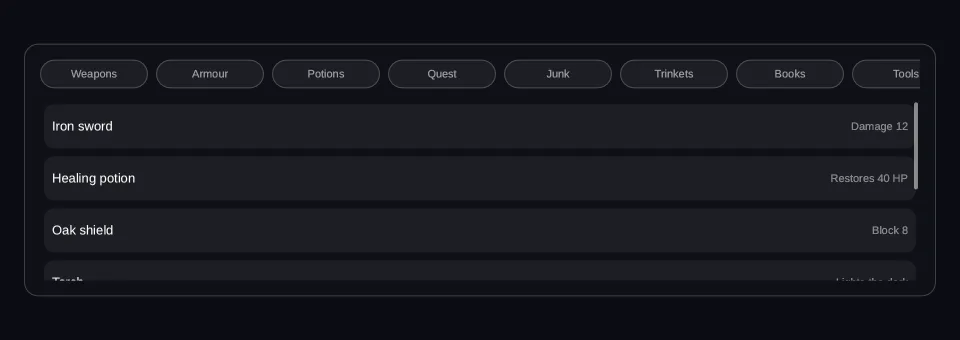
Picture a shop with forty items in a panel that fits six: the panel is the
ScrollView, and the list inside it is as tall as forty rows. In every other
respect it behaves like an ordinary box.
Viewport: 960 × 340
- hover — off
- pressed — off
- focused — off
- selected — off
- disabled — off
Reported from the last painted frame
Not running — press Run to draw this on the GPU.
import { Column, Row, ScrollView, Text } from "@zabloo/react";


const ROWS = [
  { name: "Iron sword", detail: "Damage 12" },
  { name: "Healing potion", detail: "Restores 40 HP" },
  { name: "Oak shield", detail: "Block 8" },
  { name: "Torch", detail: "Lights the dark" },
  { name: "Rope, 20m", detail: "Sturdy" },
  { name: "Guild seal", detail: "Quest item" },
  { name: "Silver ring", detail: "Sells for 60" },
];

/**
 * Nine, so the row overflows at every viewport the stage offers (ZAB-153):
 * 9 × 10⁸ plus its gaps is 1036, wider than the 872 even a desktop preset
 * leaves. A scroller with nothing past its edge demonstrates nothing.
 */
const CHIPS = [
  "Weapons",
  "Armour",
  "Potions",
  "Quest",
  "Junk",
  "Trinkets",
  "Books",
  "Tools",
  "Rations",
];

export default function ScrollViewList() {
  return (
    <Column
      // `align: "stretch"` on the ROOT is what hands the panel the view's own
      // width; centring it instead would pin the panel to its content and no
      // change of viewport could reach it (ZAB-153).
      layout={{ grow: 1, justify: "center", align: "stretch", padding: "{space.6}" }}
      style={{ background: "{color.bg}" }}
    >
      <Column
        id="panel"
        layout={{ padding: "{space.4}", gap: "{space.3}", align: "stretch" }}
        style={{
          background: "{color.surface}",
          radius: "{radius.lg}",
          borderWidth: "{border.hairline}",
          borderColor: "{color.line}",
        }}
      >
        {/* A horizontal scroller of chips: `axis` frees the width, `direction`
            keeps them in a row. A scrollable axis offers no width, so the
            labels inside never wrap. No `width` of its own — the panel's
            `align: "stretch"` gives it one, which is the whole reason a
            narrower viewport shows fewer chips. */}
        <ScrollView
          id="categories"
          axis="horizontal"
          scrollbar={false}
          layout={{ direction: "row", gap: "{space.2}" }}
        >
          {CHIPS.map((name) => (
            <Row
              key={name}
              layout={{ padding: "{space.2}", width: 108, justify: "center", align: "center" }}
              style={{
                background: "{color.slot}",
                radius: "{radius.pill}",
                borderWidth: "{border.hairline}",
                borderColor: "{color.line}",
              }}
            >
              <Text style={{ color: "{color.muted}", fontSize: "{text.xs}" }}>{name}</Text>
            </Row>
          ))}
        </ScrollView>

        {/* The vertical viewport: seven rows of 44 inside 180px of window, so
            there is always something below the fold. It always clips — paint
            and hit-testing both — so a row past the edge is neither drawn nor
            tappable. */}
        <ScrollView
          id="stock"
          layout={{
            height: 180,
            padding: "{space.1}",
            align: "stretch",
            gap: "{space.2}",
          }}
        >
          {ROWS.map((row) => (
            <Row
              key={row.name}
              layout={{ height: 44, padding: "{space.2}", gap: "{space.3}", align: "center" }}
              style={{ background: "{color.slot}", radius: "{radius.md}" }}
            >
              <Text layout={{ grow: 1 }} style={{ color: "{color.text}", fontSize: "{text.sm}" }}>
                {row.name}
              </Text>
              <Text style={{ color: "{color.faint}", fontSize: "{text.xs}" }}>{row.detail}</Text>
            </Row>
          ))}
        </ScrollView>
      </Column>
    </Column>
  );
}
{
"v": 1,
"tokens": {
"color.bg": "#0b0d13",
"color.surface": "#0e1016",
"color.raised": "#14141a",
"color.line": "#ffffff1f",
"color.line-strong": "#ffffff24",
"color.text": "#ffffff",
"color.muted": "#a1a1aa",
"color.faint": "#8a8a93",
"color.on-brand": "#ffffff",
"color.brand": "#8b5cf6",
"color.brand-strong": "#7c3aed",
"color.brand-hover": "#8b5cf6",
"color.brand-pressed": "#6d28d9",
"color.brand-soft": "#8b5cf61f",
"color.gold": "#fcd34d",
"color.slot": "#ffffff08",
"color.danger": "#f87171",
"radius.sm": 6,
"radius.md": 10,
"radius.lg": 14,
"radius.pill": 999,
"border.hairline": 1,
"border.focus": 2,
"space.1": 4,
"space.2": 8,
"space.3": 12,
"space.4": 16,
"space.5": 20,
"space.6": 24,
"text.xs": 11,
"text.sm": 13,
"text.md": 15,
"text.lg": 17,
"motion.fast": 120,
"motion.loop": 900
},
"views": {
"scrollview-list": {
"type": "Container",
"layout": {
"direction": "column",
"grow": 1,
"justify": "center",
"align": "stretch",
"padding": "{space.6}"
},
"style": {
"background": "{color.bg}"
},
"children": [
{
"type": "Container",
"id": "panel",
"layout": {
"direction": "column",
"padding": "{space.4}",
"gap": "{space.3}",
"align": "stretch"
},
"style": {
"background": "{color.surface}",
"radius": "{radius.lg}",
"borderWidth": "{border.hairline}",
"borderColor": "{color.line}"
},
"children": [
{
"type": "ScrollView",
"id": "categories",
"layout": {
"direction": "row",
"gap": "{space.2}"
},
"axis": "horizontal",
"scrollbar": false,
"children": [
{
"type": "Container",
"layout": {
"direction": "row",
"padding": "{space.2}",
"width": 108,
"justify": "center",
"align": "center"
},
"style": {
"background": "{color.slot}",
"radius": "{radius.pill}",
"borderWidth": "{border.hairline}",
"borderColor": "{color.line}"
},
"children": [
{
"type": "Text",
"style": {
"color": "{color.muted}",
"fontSize": "{text.xs}"
},
"text": "Weapons"
}
]
},
{
"type": "Container",
"layout": {
"direction": "row",
"padding": "{space.2}",
"width": 108,
"justify": "center",
"align": "center"
},
"style": {
"background": "{color.slot}",
"radius": "{radius.pill}",
"borderWidth": "{border.hairline}",
"borderColor": "{color.line}"
},
"children": [
{
"type": "Text",
"style": {
"color": "{color.muted}",
"fontSize": "{text.xs}"
},
"text": "Armour"
}
]
},
{
"type": "Container",
"layout": {
"direction": "row",
"padding": "{space.2}",
"width": 108,
"justify": "center",
"align": "center"
},
"style": {
"background": "{color.slot}",
"radius": "{radius.pill}",
"borderWidth": "{border.hairline}",
"borderColor": "{color.line}"
},
"children": [
{
"type": "Text",
"style": {
"color": "{color.muted}",
"fontSize": "{text.xs}"
},
"text": "Potions"
}
]
},
{
"type": "Container",
"layout": {
"direction": "row",
"padding": "{space.2}",
"width": 108,
"justify": "center",
"align": "center"
},
"style": {
"background": "{color.slot}",
"radius": "{radius.pill}",
"borderWidth": "{border.hairline}",
"borderColor": "{color.line}"
},
"children": [
{
"type": "Text",
"style": {
"color": "{color.muted}",
"fontSize": "{text.xs}"
},
"text": "Quest"
}
]
},
{
"type": "Container",
"layout": {
"direction": "row",
"padding": "{space.2}",
"width": 108,
"justify": "center",
"align": "center"
},
"style": {
"background": "{color.slot}",
"radius": "{radius.pill}",
"borderWidth": "{border.hairline}",
"borderColor": "{color.line}"
},
"children": [
{
"type": "Text",
"style": {
"color": "{color.muted}",
"fontSize": "{text.xs}"
},
"text": "Junk"
}
]
},
{
"type": "Container",
"layout": {
"direction": "row",
"padding": "{space.2}",
"width": 108,
"justify": "center",
"align": "center"
},
"style": {
"background": "{color.slot}",
"radius": "{radius.pill}",
"borderWidth": "{border.hairline}",
"borderColor": "{color.line}"
},
"children": [
{
"type": "Text",
"style": {
"color": "{color.muted}",
"fontSize": "{text.xs}"
},
"text": "Trinkets"
}
]
},
{
"type": "Container",
"layout": {
"direction": "row",
"padding": "{space.2}",
"width": 108,
"justify": "center",
"align": "center"
},
"style": {
"background": "{color.slot}",
"radius": "{radius.pill}",
"borderWidth": "{border.hairline}",
"borderColor": "{color.line}"
},
"children": [
{
"type": "Text",
"style": {
"color": "{color.muted}",
"fontSize": "{text.xs}"
},
"text": "Books"
}
]
},
{
"type": "Container",
"layout": {
"direction": "row",
"padding": "{space.2}",
"width": 108,
"justify": "center",
"align": "center"
},
"style": {
"background": "{color.slot}",
"radius": "{radius.pill}",
"borderWidth": "{border.hairline}",
"borderColor": "{color.line}"
},
"children": [
{
"type": "Text",
"style": {
"color": "{color.muted}",
"fontSize": "{text.xs}"
},
"text": "Tools"
}
]
},
{
"type": "Container",
"layout": {
"direction": "row",
"padding": "{space.2}",
"width": 108,
"justify": "center",
"align": "center"
},
"style": {
"background": "{color.slot}",
"radius": "{radius.pill}",
"borderWidth": "{border.hairline}",
"borderColor": "{color.line}"
},
"children": [
{
"type": "Text",
"style": {
"color": "{color.muted}",
"fontSize": "{text.xs}"
},
"text": "Rations"
}
]
}
]
},
{
"type": "ScrollView",
"id": "stock",
"layout": {
"height": 180,
"padding": "{space.1}",
"align": "stretch",
"gap": "{space.2}"
},
"children": [
{
"type": "Container",
"layout": {
"direction": "row",
"height": 44,
"padding": "{space.2}",
"gap": "{space.3}",
"align": "center"
},
"style": {
"background": "{color.slot}",
"radius": "{radius.md}"
},
"children": [
{
"type": "Text",
"layout": {
"grow": 1
},
"style": {
"color": "{color.text}",
"fontSize": "{text.sm}"
},
"text": "Iron sword"
},
{
"type": "Text",
"style": {
"color": "{color.faint}",
"fontSize": "{text.xs}"
},
"text": "Damage 12"
}
]
},
{
"type": "Container",
"layout": {
"direction": "row",
"height": 44,
"padding": "{space.2}",
"gap": "{space.3}",
"align": "center"
},
"style": {
"background": "{color.slot}",
"radius": "{radius.md}"
},
"children": [
{
"type": "Text",
"layout": {
"grow": 1
},
"style": {
"color": "{color.text}",
"fontSize": "{text.sm}"
},
"text": "Healing potion"
},
{
"type": "Text",
"style": {
"color": "{color.faint}",
"fontSize": "{text.xs}"
},
"text": "Restores 40 HP"
}
]
},
{
"type": "Container",
"layout": {
"direction": "row",
"height": 44,
"padding": "{space.2}",
"gap": "{space.3}",
"align": "center"
},
"style": {
"background": "{color.slot}",
"radius": "{radius.md}"
},
"children": [
{
"type": "Text",
"layout": {
"grow": 1
},
"style": {
"color": "{color.text}",
"fontSize": "{text.sm}"
},
"text": "Oak shield"
},
{
"type": "Text",
"style": {
"color": "{color.faint}",
"fontSize": "{text.xs}"
},
"text": "Block 8"
}
]
},
{
"type": "Container",
"layout": {
"direction": "row",
"height": 44,
"padding": "{space.2}",
"gap": "{space.3}",
"align": "center"
},
"style": {
"background": "{color.slot}",
"radius": "{radius.md}"
},
"children": [
{
"type": "Text",
"layout": {
"grow": 1
},
"style": {
"color": "{color.text}",
"fontSize": "{text.sm}"
},
"text": "Torch"
},
{
"type": "Text",
"style": {
"color": "{color.faint}",
"fontSize": "{text.xs}"
},
"text": "Lights the dark"
}
]
},
{
"type": "Container",
"layout": {
"direction": "row",
"height": 44,
"padding": "{space.2}",
"gap": "{space.3}",
"align": "center"
},
"style": {
"background": "{color.slot}",
"radius": "{radius.md}"
},
"children": [
{
"type": "Text",
"layout": {
"grow": 1
},
"style": {
"color": "{color.text}",
"fontSize": "{text.sm}"
},
"text": "Rope, 20m"
},
{
"type": "Text",
"style": {
"color": "{color.faint}",
"fontSize": "{text.xs}"
},
"text": "Sturdy"
}
]
},
{
"type": "Container",
"layout": {
"direction": "row",
"height": 44,
"padding": "{space.2}",
"gap": "{space.3}",
"align": "center"
},
"style": {
"background": "{color.slot}",
"radius": "{radius.md}"
},
"children": [
{
"type": "Text",
"layout": {
"grow": 1
},
"style": {
"color": "{color.text}",
"fontSize": "{text.sm}"
},
"text": "Guild seal"
},
{
"type": "Text",
"style": {
"color": "{color.faint}",
"fontSize": "{text.xs}"
},
"text": "Quest item"
}
]
},
{
"type": "Container",
"layout": {
"direction": "row",
"height": 44,
"padding": "{space.2}",
"gap": "{space.3}",
"align": "center"
},
"style": {
"background": "{color.slot}",
"radius": "{radius.md}"
},
"children": [
{
"type": "Text",
"layout": {
"grow": 1
},
"style": {
"color": "{color.text}",
"fontSize": "{text.sm}"
},
"text": "Silver ring"
},
{
"type": "Text",
"style": {
"color": "{color.faint}",
"fontSize": "{text.xs}"
},
"text": "Sells for 60"
}
]
}
]
}
]
}
]
}
}
}The two tables below match, and the reason is the point of the node: a
ScrollView carries no state to author. Normally what you write and what ships
differ because a theme or a component resolved something away; here there is
nothing to resolve. The offset — the one number a scroller really has — is never
in the IR at all, because it belongs to the player.
Authoring props
What you write in @zabloo/react.
| Prop | Type | Default | Description |
|---|---|---|---|
| axis | "vertical" | "horizontal" | "both" | "vertical" | Scrollable axis. "both" frees both. |
| scrollbar | boolean | true | The SDK's overlay indicator, visible only while there is something to scroll. |
| children | ReactNode | absent | Content. |
On top of these, every component takes the node base props — id, visible,
disabled, layout, style, states, transition, autofocus, clip —
plus variant, which the theme resolves away at export time and which never
appears in the IR.
IR props
What ships to the game, after the authoring layer is gone.
| Prop | Type | Default | Description |
|---|---|---|---|
| axis | "vertical" | "horizontal" | "both" | "vertical" | The axis children are measured unconstrained on. |
| scrollbar | boolean | true | Overlay position indicator painted by the SDK. |
| children | ZNode[] | [] | Ordinary flow children. |
Layout
A ScrollView is a normal flex container on both sides: its own size comes
from its layout, and direction/justify/align/gap/padding lay its
children out as any container would. One thing differs — on the scrollable axis,
children are measured unconstrained, so they take their natural size, and
that is what the player scrolls through. padding counts as content: it pads the
children and expands the scrollable bounds.
axis says which way the content may overflow; layout.direction says which way the
children flow. A horizontal strip of chips is axis: "horizontal" and
direction: "row". And because a scrollable axis offers no width to its children,
Text inside a horizontal scroller never wraps.
Size the viewport yourself. A ScrollView without a width/height hugs
its content, and there is then nothing to scroll. grow alone does not size it
either — its measured size is the whole content, so no leftover ever reaches
it. To fill what is left of a parent, zero the base on that axis: height: 0
with grow: 1 in a column.
Behavior
- States
disabledonly — and it keeps scrolling while disabled, its own or inherited. Scrolling is not an interaction a control owns, and a panel the player cannot use is still one they must be able to read. Its children keep their own states.- Focusable
No, and it does not need to be. The player drags, spins the wheel or pushes the right stick → the SDK moves the offset → nothing is sent to the game. The same machinery does the auto-reveal that brings a newly focused node into view. Dragging past a
Buttonscrolls; it does not turn into a click on it.- Clipping
Always, paint and hit-testing, and an explicit
clip: falseis ignored. A row past the edge is neither drawn nor tappable. The offset is runtime state owned by the SDK — never authored, never serialized — and it is re-clamped tomax(0, content − viewport)on every relayout, so closing aCollapseinside a list settles the list at its new end instead of leaving it hanging past it.- Actions
None: the game hears nothing when a player scrolls. There is no
onScrollin v1 and the offset is not bindable; a game moves it through the host channel withSetScroll(id, x, y). Deferred, all compatible extensions: an authored or bindable offset, inertia, snapping, and a styleable scrollbar.
Degradation
On an older SDK the whole list shows at once, spilling past the panel that should have held it. Nothing is missing; nothing scrolls.
As a Container: the content shows in full, overflowing its parent, with nothing to scroll and nothing clipped. Everything is still there and still readable — what is lost is the window, which is the least destructive way a viewport can fail.
Composition
Repetition and scrolling are separate capabilities, and they compose: a
data-driven list is a <List> inside a
<ScrollView>, not a prop on either.
- A sized vertical viewport — use it for any panel whose contents can grow past the space allowed: an inventory, a quest log, a settings page.
- A horizontal strip — use it for a row of categories or filters that will not fit across the screen on a phone.
- A scroller around a
<List>— use it when the rows come from the game’s own array and there may be any number of them.
// A sized viewport. Without width/height it would hug its content.
<ScrollView layout={{ width: 460, height: 340, align: "stretch", gap: 4 }}>
{items.map((item) => <ItemRow key={item.id} item={item} />)}
</ScrollView>

// A horizontal strip: axis frees the width, direction keeps the chips in a row.
<ScrollView axis="horizontal" scrollbar={false} layout={{ direction: "row", width: 460, gap: 8 }}>
{categories.map((name) => <Chip key={name} name={name} />)}
</ScrollView>

// Data-driven and scrollable: two nodes, one for each capability.
<ScrollView layout={{ width: 460, height: 340, align: "stretch", gap: 8 }}>
<List items="shop.items" as="it" keyPath="id">
  {(it) => <Row layout={{ gap: 12 }}><Text bind={it("name")} /></Row>}
</List>
</ScrollView>